Getting started
Presentation of the Firefox configuration options
At first glance we can see that we have a selection of five configuration options that we need to fill in, they are highlighted here in this screenshot:
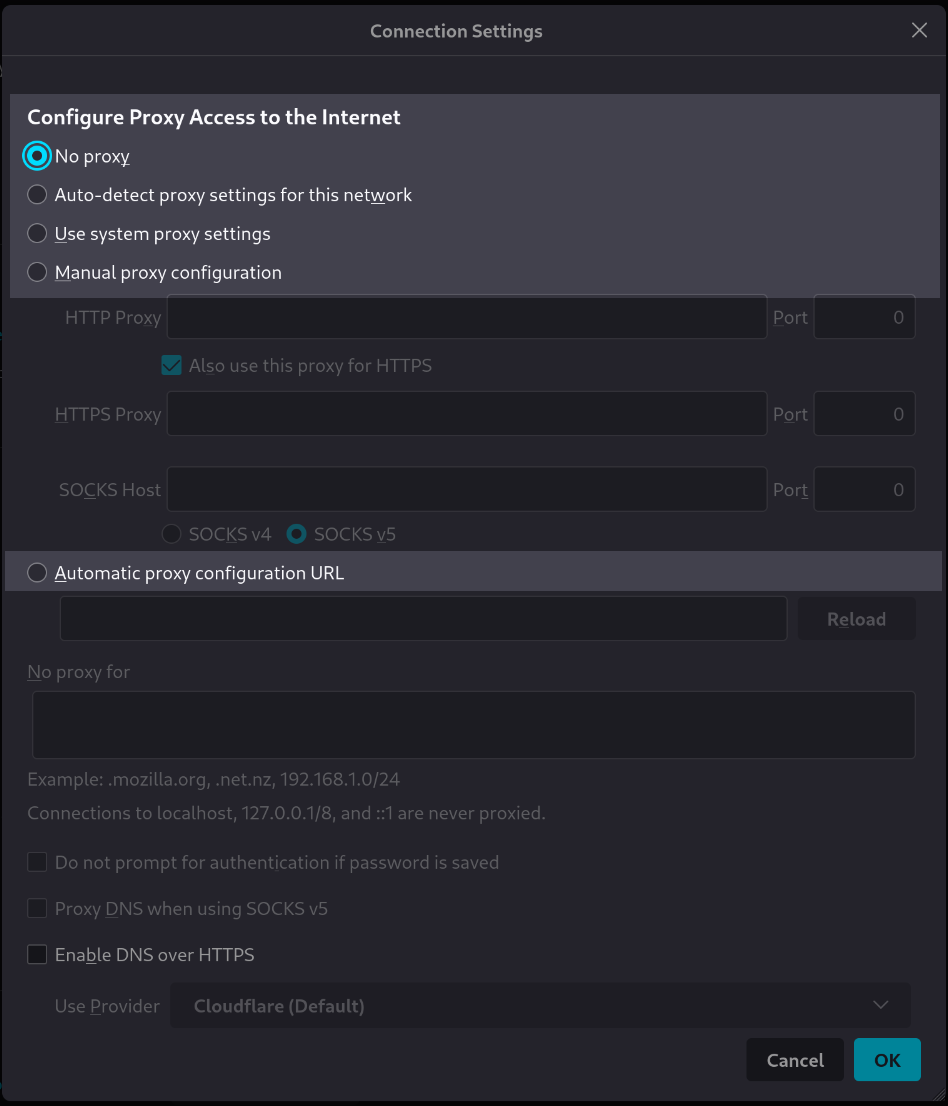
We’ll learn in this tutorial how to set the values of the configuration options in a clean way with the Rougail library.
Objectives of this section
We will learn how to:
create a structure description file
add a structure file format version in the structure file
add a variable in the structure file and set its default value
Prerequisites
We assume that Rougail’s library is installed on your computer.
It is possible to retrieve the current state of the various Rougail files manipulated in this tutorial step by checking out the corresponding tag of the
rougail-tutorialsgit repository. Each tag corresponds to a stage of progress in the tutorial. Of course, you can also decide to copy/paste or download the tutorial files contents while following the tutorial steps.
If you want to follow this tutorial with the help of the corresponding rougail-tutorials git repository, this workshop page corresponds to the tags v1.1_000 to v1.1_003 in the repository:
git clone https://forge.cloud.silique.fr/stove/rougail-tutorials.git
git switch --detach v1.1_000
Creating a structure file
The folder structure
Here is the tree structure we want to have:
rougail-tutorials
└── firefox
    └── 00-proxy.yml
Let’s make a
rougail-tutorialsdirectory, with afirefoxsubfolder.First, we will create a structure file, so let’s create a
00-proxy.ymlfile located in thefirefoxsubfolder.
This is an empty Rougail structure description file:
%YAML 1.2
---
version: 1.1
...
Download this file from the rougail-tutorials git repository
This version specification is just the Rougail YAML’s format version specification.
YAML files are loaded using a version 1.2 file parser. It is recommended (but not mandatory) to specify this in the file header, especially for linters.
By now, we have an empty structure file with the format specification in it.
Let’s add our first variable
For those who follow the tutorial with the help of the git repository
Now you need to checkout the v1.1_001 version:
git switch --detach v1.1_001
A variable is defined at a minimum by its name.
A variable lives in the structure description file.
Here we define a variable named proxy_mode:
%YAML 1.2
---
version: 1.1

proxy_mode:
...
Download this file from the rougail-tutorials git repository
Let’s run the Rougail CLI utility command in a terminal:
rougail -m firefox/
Well, we notice that we have an error:
🛑 Caution
┗━━ proxy_mode: 🛑 mandatory variable but has no value
It’s because this first defined variable is mandatory and needs to have a value set but there’s no value yet.
We can therefore deduce the fact that:
Fact
Once defined, an option configuration value is mandatory by default. That is to say, it is absolutely necessary to assign a value to this variable.
Rougail expects the proxy_mode configuration option’s value to be set.
- mandatory
A variable is mandatory when a value is required, that is,
Noneis not a possible value. It must have a defined value.
See also
To go further, have a look at the mandatory option according to the Tiramisu underlyning consistency system. You will learn that it is actually possible to disable the mandatory property behavior, but you need to declare it explicitely.
Describe the variable
Let’s add a variable’s description, which is not mandatory but which is usually a good practice.
For those who follow the tutorial with the help of the git repository
Now you need to checkout the v1.1_002 version:
git switch --detach v1.1_002
%YAML 1.2
---
version: 1.1

proxy_mode:  # Configure Proxy Access to the Internet
...
Download this file from the rougail-tutorials git repository
You have two way to define a variable’s description:
the verbose way:
proxy_mode:
  description: Configure Proxy Access to the Internet
or a short-hand way, setting the description using the “
#” YAML comment notation:proxy_mode: # Configure Proxy Access to the Internet
If we launch the Rougail CLI command:
we have this output:
╭─────── Caption ────────╮
│ Variable Default value │
╰────────────────────────╯
Variables:
┗━━ 📓 proxy_mode (Configure Proxy Access to the Internet): null
We can see here that the variable’s description string “Configure Proxy Access to the Internet” is used
to refer to the proxy_mode variable.
Note
The description is used in UI tools and outputs instead of the variable name. The goal here is to provide an explanation of the variable for the user, not to show the technical name of the variable as defined by the integrator.
Set a default value
For those who follow the tutorial with the help of the git repository
Now you need to checkout the v1.1_003 version:
git switch --detach v1.1_003
We will learn different ways to set a value, the first way is setting a default value.
- default value
A default value is a variable value that is predefined, that’s why this value is placed right in the structure file.
Let’s add a default value to this proxy_mode variable.
%YAML 1.2
---
version: 1.1

proxy_mode: No proxy  # Configure Proxy Access to the Internet
...
Download this file from the rougail-tutorials git repository
The proxy_mode variable requires a value, that’s why we have set a No proxy default value.
╭─────── Caption ────────╮
│ Variable Default value │
╰────────────────────────╯
Variables:
┗━━ 📓 proxy_mode (Configure Proxy Access to the Internet): No proxy
As we have set the proxy_mode’s value as No proxy by default,
The chosen value is indicated in the Rougail’s CLI output as the default choice.
here is the short-hand default setting and description:
proxy_mode: No proxy # Configure Proxy Access to the Internet
and there is the verbose way of setting a default value:
proxy_mode:
  description: Configure Proxy Access to the Internet
  default: No proxy
There are some other short-hand ways with Rougail that you may encounter as you read the Rougail’s documentation and tutorial.
How to set a value – the assignment
A default value has been set, great. This raises a question about what a normal value is.
Now then how can I assign a normal value to a variable?
The different Rougail roles and setting a variable’s value
So far we have only talked about the actor that writes the structure files. The one who writes the structure file plays the role of the integrator.
Now we will talk about the one that defines the values. His role is called the operator role.
It is the operator’s responsibility to set the user data variables values. The operator does not handle the structure files, he is responsible of other files called the user data files.
Important
For now, we don’t know how to disable the default mandatory settings,
so if neither a default value nor a user value are set for a given variable, Rougail will raise an error.
Folder structure update
Now we add a user data file named config/config.yml in our project:
rougail-tutorials
├── firefox
│   ├── 00-proxy.yml
└── config
    └── config.yml
How to set a user data value
If the integrator has not set any default value in his structure file,
it’s up to the operator to do the job in the config.yml file:
config/config.yml, with a value set.---
proxy_mode: No proxy
Download this file from the rougail-tutorials git repository
The operator needs to add the -u yaml -yf config/config.yml options to the Rougail CLI:
which gives us this output:
╭────────────── Caption ───────────────╮
│ Variable Modified value              │
│          (⏳ Original default value) │
╰──────────────────────────────────────╯
Variables:
┗━━ 📓 proxy_mode (Configure Proxy Access to the Internet): No proxy ◀ loaded
    from the YAML file "config/02/config.yml" (⏳ No proxy)
Now the proxy_mode’s new No proxy value is the same as the default value but we see in the Rougail CLI output that the value
comes from the config/02/config.yml user data file. From now on this proxy_mode variable’s value
is a user data value and not a default value (even if it’s actually the same value).
Structure values and user data values
We can see with the Rougail CLI utility where the values come from. It can come from an integrator’s setting or from an operator’s setting.
Reminder
the integrator works on structure files, he can define default value for variables
the operator works on user data files, he only can set user data values for variables
Most of the time, the integrator and the operator are one and the same person, here we are talking about roles and not necessarily about people.
User data files are where the user values live
We need to set the values in separate files, called user data files.
- user data file
A user data file is a file where only user data are set.
A user file is a file where there are only user data in it, users can set values, called user values – that is variable’s values that have been set by an operator.
see also user data
Key points progress
Keywords
structure file: structure description file
variable: an option’s name which has a value
a variable’s description
a variable’s mandatory value
a variable’s default value
a variable’s user value
the integrator and operator roles