Group variables inside families
Objectives
We will learn how to:
Prerequisites
We assume that Rougail’s library is installed on your computer.
It is possible to retrieve the current state of the various Rougail files manipulated in this tutorial step by checking out the corresponding tag of the
rougail-tutorialsgit repository. Each tag corresponds to a stage of progress in the tutorial. Of course, you can also decide to copy/paste or download the tutorial files contents while following the tutorial steps.
If you want to follow this tutorial with the help of the corresponding rougail-tutorials git repository, this workshop page corresponds to the tags v1.1_020 to v1.1_022 in the repository.
git clone https://forge.cloud.silique.fr/stove/rougail-tutorials.git
git switch --detach v1.1_020
Let’s recap how far we’ve come
We have this choice variable in its structure definition file:
proxy_mode choice variable in the firefox/00-proxy.yml structure file 1%YAML 1.2
2---
3version: 1.1
4
5proxy_mode:
6 description: Configure Proxy Access to the Internet
7 choices:
8 - No proxy
9 - Auto-detect proxy settings for this network
10 - Use system proxy settings
11 - Manual proxy configuration
12 - Automatic proxy configuration URL
13 default: No proxy
14...
In short, let’s describe our proxy_mode variable like this:
- proxy_mode
- Type:
choice- Default:
- No proxy
Proxy mode’s settings
Now we will define new variables, and other structure definitions. For the sake of clarity, we will put the structure definitions in separate files. Please have a look at the file naming and organizing convention.
Here we made a firefox/00-proxy.yml structure file and we’re gonna make
a new structure file named firefox/10-manual.yml:
.
└── firefox
    ├── 00-proxy.yml
    └── 10-manual.yml
Creating a new family
Let’s create a family named manual which obviously corresponds to the proxy’s manual configuration choice.
manual in a firefox/10-manual.yml file%YAML 1.2
---
version: 1.1
manual:
description: Manual proxy configuration
type: family
...
We can see that we have defined a family here, and this family is empty which means that this family is a container variable that contains no variable yet.
Warning
If a family is empty, we need to specify the family type here because if we don’t, the Rougail’s type engine will infer it by default as a variable. We have to force the family type inference.
It’s because we don’t have set any variable inside yet. When we will have a variable inside of this family, we will make a YAML block (to create a block in YAML, you just need to indent the lines) and the Rougail’s type inference engine will implicitely infer the variable’s container as a family type.
Important
Any family that has been declared in a structure file but is empty (i.e., contains neither variables nor subfamilies) is not taken into account by the low level Tiramisu consistency engine.
Or a sub family
For those who follow the tutorial with the help of the git repository
Now you need to checkout the v1.1_021 version:
git switch --detach v1.1_021
- sub family
A sub family is a family inside a family.
Creating a family hierarchy of families (family inside a family) is very easy:
%YAML 1.2
---
version: 1.1

manual:  # Manual proxy configuration

  http_proxy:
    description: HTTP Proxy
    type: family
...
Download this file from the rougail-tutorials git repository
Here in our use case we used the short-hand declaration mode
to declare our manual family:
manual: # Manual proxy configuration
And the http_proxy family lives inside of this manual family.
We therefore created a hierarchy of families.
Putting a variable inside of a family or a sub family
For those who follow the tutorial with the help of the git repository
Now you need to checkout the v1.1_022 version:
git switch --detach v1.1_022
We are going to put a variable inside of a family or a sub family
Let’s create a variable in the http_proxy family.
address variable in the http_proxy family%YAML 1.2
---
version: 1.1
manual: # Manual proxy configuration
http_proxy: # HTTP Proxy
address: # HTTP address
...
Download this file from the rougail-tutorials git repository
Now that the address variable is declared, the operator can set a value to it.
In short, let’s describe our address variable like this:
- address
- Default:
- None
This is the HTTP address of the proxy
We have reached the definition of the address in the http_proxy family; there will be other variables to define in this family.
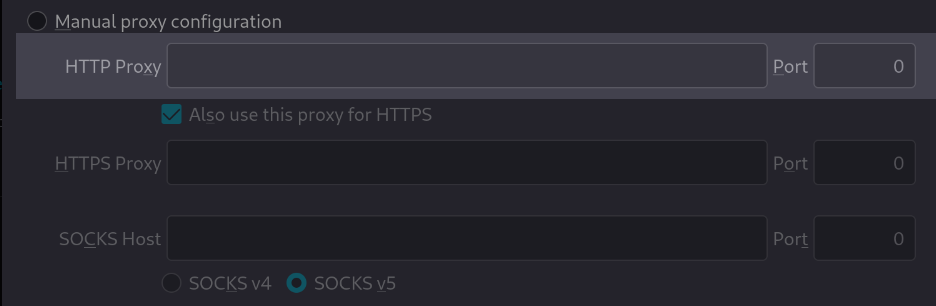
Assigning a user value
Now we need to set a value for the address variable,
otherwise we will get an error if we try to access this variable:
🛑 Caution
┗━━ manual (Manual proxy configuration)
    ┗━━ http_proxy (HTTP Proxy)
        ┗━━ address (HTTP address): 🛑 mandatory variable but has no value
Let’s set user values in a user data file
Here is a user data file sample:
config/03/config.yml with a value set for the address variable---
manual:
http_proxy:
address: example.net
Download this file from the rougail-tutorials git repository
Let’s validate the consitency of the configuration:
Everything is OK:
╭──────── Caption ────────╮
│ Variable Default value  │
│          Modified value │
╰─────────────────────────╯
Variables:
┣━━ 📓 proxy_mode (Configure Proxy Access to the Internet): No proxy
┗━━ 📂 manual (Manual proxy configuration)
    ┗━━ 📂 http_proxy (HTTP Proxy)
        ┗━━ 📓 address (HTTP address): example.net ◀ loaded from the YAML file
            "config/02/config.yml"
Let’s recap about the user data. We can see in this Rougail CLI output that:
the
proxy_modevalue is set by default by the integratorthe
addressvalue is has been set by an operator
Let’s review the key points
Keywords
we know how to define variables inside of a family
we now know what a mandatory variable is and why it is necessary to assign values to the variables
we kwow how to set a variable’s user value
we have the big picture : the configuration, which is (the structure files + the user data files)
Progress
we have a family named
manualand a sub family namedhttp_proxyAnd we have now two variables:
proxy_modeandaddress.
See also
The full documentation about a family.