Define access to variable or family
Objectives
In this section we will see what a disabled variable or family is, and why it can be interesting
to assign the disabled property to a variable or a family.
Then we’ll see the same thing for the hidden property.
We’ll also learn the difference between disabling and hiding families or variables.
We will:
Disabling and hiding are two families or variables properties.
Prerequisites
We assume that Rougail’s library is installed on your computer.
It is possible to retrieve the current state of the various Rougail files manipulated in this tutorial step
by checking out the corresponding tag of the rougail-tutorials git repository.
Each tag corresponds to a stage of progress in the tutorial.
Of course, you can also decide to copy/paste or download the tutorial files contents while following the tutorial steps.
If you want to follow this tutorial with the help of the corresponding rougail-tutorials git repository,
this workshop page corresponds to the tags v1.1_050 to v1.1_053
in the repository.
git clone https://forge.cloud.silique.fr/stove/rougail-tutorials.git
git switch --detach v1.1_050
Let’s begin with defining what a property is:
- property
A property is a state (disabled, mandatory, frozen, hidden…)
of a family, a subfamily or a variable.
These properties change the usual behavior of a variable or family.
A disabled family
Here we are going to assign the disabled property to the manual family:
The manual family has the disabled property set in this firefox/10-manual.yml structure file
%YAML 1.2
---
version: 1.1

manual:
  description: Manual proxy configuration
  disabled: true

  http_proxy:  # HTTP Proxy

    address:
      description: HTTP address
      type: domainname
      params:
        allow_ip: true

    port:
      description: HTTP Port
      type: port
      default: 8080
...
Notice that we have this disabled: true property assigned to the manual family.
Let’s launch the Rougail CLI on this structure file (whith an empty user data file):
rougail -m firefox/ -u yaml -yf config/01/config.yml
The Rougail CLI outputs this:
╭─────── Caption ────────╮
│ Variable Default value │
╰────────────────────────╯
Variables:
┗━━ 📓 proxy_mode (Configure Proxy Access to the Internet): No proxy
We can deduce from the Rougail CLI output that the manual family is not taken into account by Rougail.
So what does this disabled property exactly?
- disabled
The disabled property is a property that can be assigned to a variable or a family.
It makes the configuration act as if the variable or family that has this property has not even been defined.
It simply doesn’t exist (it is deactivated) for the whole configuration.
Note
Note that if a family has been disabled, all variables and sub-families that it contains are disabled.
And if we try to assign values to variables that have been disabled, here is what happens:
In this config/02/config.yml user data file, we assign values to variables that have been disabled
---
proxy_mode: Manual proxy configuration
manual:
  http_proxy:
    address: http.proxy.net
    port: 3128
  use_for_https: false
If we launch the Rougail CLI:
rougail -m firefox/ -u yaml -yf config/02/config.yml --cli.unknown_user_data_error
Note
The --cli.unknown_user_data_error option changes the behaviour of the Rougail CLI’s standard output:
when an unknown (or disabled or hidden) variable is declared in the user data file
then it appears in the output as an error instead of a warning.
It outputs:
🛑 Caution
┣━━ proxy_mode (Configure Proxy Access to the Internet): 🛑 cannot modify the
┃   option "proxy_mode" (Configure Proxy Access to the Internet) because is
┃   frozen, it has been loading from the YAML file "config/02/config.yml"
┗━━ manual (Manual proxy configuration)
    ┣━━ http_proxy (HTTP Proxy)
    ┃   ┣━━ address (HTTP address): 🛑 family "manual" (Manual proxy
    ┃   ┃   configuration) has property disabled, so cannot access to "address"
    ┃   ┃   (HTTP address), it has been loading from the YAML file
    ┃   ┃   "config/02/config.yml"
    ┃   ┗━━ port (HTTP Port): 🛑 family "manual" (Manual proxy configuration)
    ┃       has property disabled, so cannot access to "port" (HTTP Port), it
    ┃       has been loading from the YAML file "config/02/config.yml"
    ┗━━ use_for_https (Also use this proxy for HTTPS): 🛑 family "manual"
        (Manual proxy configuration) has property disabled, so cannot access to
        "use_for_https" (Also use this proxy for HTTPS), it has been loading
        from the YAML file "config/02/config.yml"
We can see that the Rougail CLI is warning us about the variables that we are trying to assign values on which are disabled.
Because it is not logical. We are trying to assign values to variables that are not taken into account in the configuration.
The point is that we disable them in order to expose the fact that we don’t use them,
but it’s not just that: if we fill them in, there might be a problem in the overall integrity of the whole configuration.
We shall fill and use in these variables in the Manual proxy configuration use case context only.
Otherwise, we need to disable them when they are not used.
In a practical point of view, if we fill them in, Rougail CLI will output a warning and the operator will see it.
He will wonder : “oh, what am I doing?”, I shall fill and use in these variables only in the Manual proxy configuration context.
A conditional disabled family
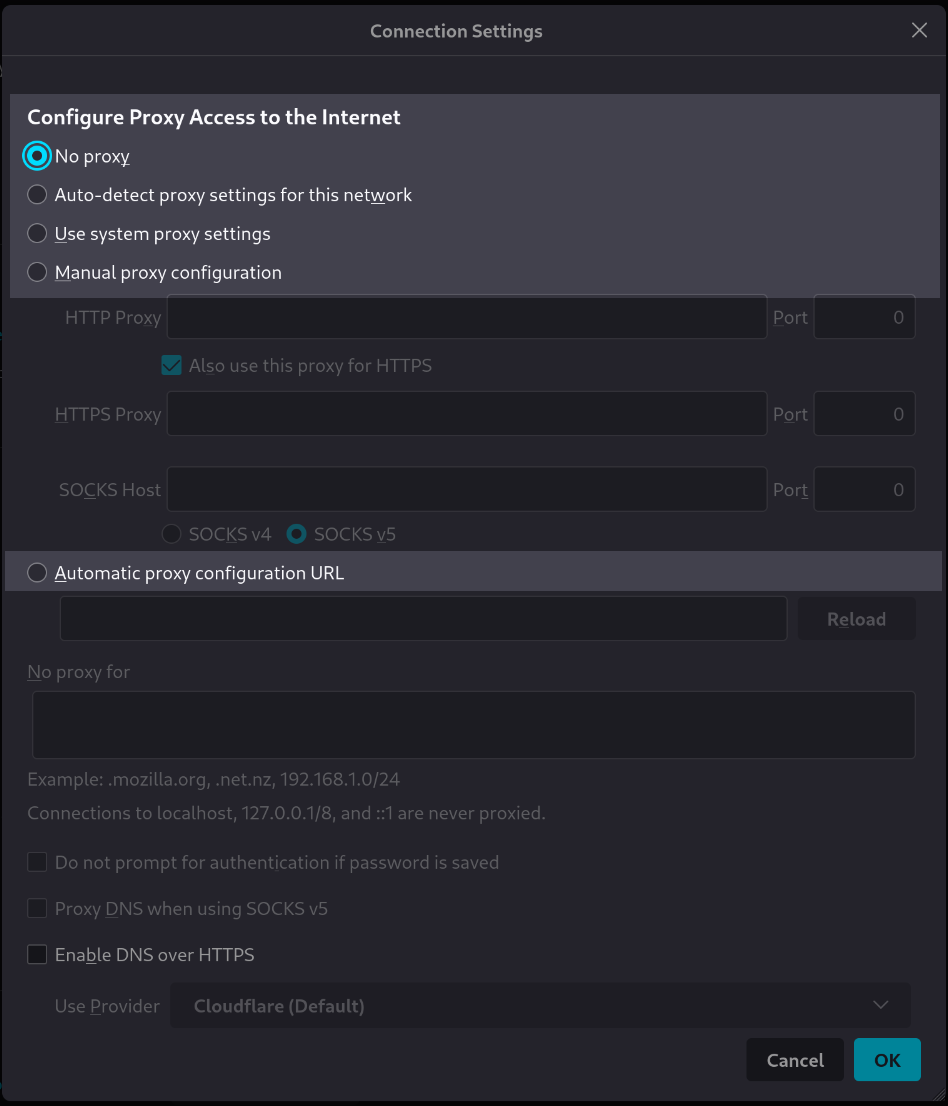
Let’s look again at our use case. We have a choice between five options
in order to set the proxy mode:
These five choices are:
No proxy
Auto-detect proxy settings for this network
Use system proxy settings
Manual proxy configuration
Automatic proxy configuration URL
Actually if the Manual proxy configuration is not selected, we don’t need to set
these address and port variables, there is no point in setting them in
four out of our five use cases.
Important
We need to disable variables or families that are not used
in a given usage context.
Disabling variables one by one can be replaced by disabling a whole family.
If we don’t choose the manual mode, we need to disable the whole manual family, it will disable
all the subfamilies and the variables in it.
Note that we’ve placed theses variables in the http_proxy
subfamily. We can then disable it or even the parent manual subfamily in order to
disable the http_proxy family and all the variables that are placed in it, because
the manual family variables shall be used only in the manual proxy use case context.
Notice the disabled: true parameter set in the manual family:
The http_proxy subfamily in the firefox/10-manual.yml structure file is disabled here
 1%YAML 1.2
 2---
 3version: 1.1
 4
 5manual:
 6  description: Manual proxy configuration
 7  disabled: true
 8
 9  http_proxy:  # HTTP Proxy
10
11    address:
12      description: HTTP address
13      type: domainname
14      params:
15        allow_ip: true
16
17    port:
18      description: HTTP Port
19      type: port
20      default: 8080
21...
For those who follow the tutorial with the help of the git repository
Now you need to checkout the v1.1_051 version:
git switch --detach v1.1_051
What could be usefull here is a dynamically disable or enable the manual family.
The idea in this section is to dynamically set the enable/disable property according to the chosen use case context.
In rougail, we can set a property’s value depending on the value of another variable.
The property’s value is conditioned by another variable.
The firefox/10-manual.yml structure file. The manual family dynamically enabled or disabled
 1%YAML 1.2
 2---
 3version: 1.1
 4
 5manual:
 6  description: Manual proxy configuration
 7  disabled:
 8    variable: _.proxy_mode
 9    when_not: Manual proxy configuration
10
11  http_proxy:  # HTTP Proxy
12
13    address:
14      description: HTTP address
15      type: domainname
16      params:
17        allow_ip: true
18
19    port:
20      description: HTTP Port
21      type: port
22      default: 8080
23...
Now the disabled property has some parameter defined. First, let’s explaine the variable parameter.
This parameter specifies the target variable. The value of this target variable
will be used to dynamically enable or disable our manual family.
We can see here that the manual family disabled or enabled property is contitionned by the _.proxy_mode variable’s value.
The target variable is _.proxy_mode.
Note
The _. notation means the current path of the family you’re currently in.
In the python quasi algorithmic notation we could say that:
_.proxy_mode == proxy_mode
This is true only because in our use case proxy_mode is located on the root path.
Now regarding the when_not parameter, this means that if the target variable’s value
is Manual proxy configuration then the manual familiy will not be disabled
(that is, it will be enabled).
Regarding as the default value use case, the proxy_mode’s variable is No proxy by default.
The manual familiy is then disabled by default.
Let’s launch the Rougail CLI on an empty user value file:
rougail -m firefox/ -u yaml -yf config/01/config.yml
We have this output:
╭─────── Caption ────────╮
│ Variable Default value │
╰────────────────────────╯
Variables:
┗━━ 📓 proxy_mode (Configure Proxy Access to the Internet): No proxy
We can see that the manual family and all the variables into it are not present.
Dynamically enabling the manual family
Now we are going to choose the manual mode, that is the Manual proxy configuration
value for the proxy_mode variable, and things will become slightly different.
If the manual mode for the proxy is not selected, then the manual family is disabled.
On the other hand, if the manual proxy’s configuration mode is selected,
then the manual family is enabled:
The proxy_mode’s manual setting in the config/02/config.yaml user datas file
1---
2proxy_mode: Manual proxy configuration
3manual:
4  http_proxy:
5    address: http.proxy.net
6    port: 3128
7  use_for_https: false
Let’s launch the Rougail CLI to verify this:
rougail -m firefox/ -u yaml -yf config/02/config.yml
It outputs:
╭────────────── Caption ───────────────╮
│ Variable Default value               │
│          Modified value              │
│          (⏳ Original default value) │
╰──────────────────────────────────────╯
Variables:
┣━━ 📓 proxy_mode (Configure Proxy Access to the Internet): Manual proxy
┃   configuration ◀ loaded from the YAML file "config/02/config.yml" (⏳ No
┃   proxy)
┗━━ 📂 manual (Manual proxy configuration)
    ┣━━ 📂 http_proxy (HTTP Proxy)
    ┃   ┣━━ 📓 address (HTTP address): http.proxy.net ◀ loaded from the YAML
    ┃   ┃   file "config/02/config.yml"
    ┃   ┗━━ 📓 port (HTTP Port): 3128 ◀ loaded from the YAML file
    ┃       "config/02/config.yml" (⏳ 8080)
    ┣━━ 📓 use_for_https (Also use this proxy for HTTPS): false ◀ loaded from
    ┃   the YAML file "config/02/config.yml" (⏳ true)
    ┗━━ 📂 https_proxy (HTTPS Proxy)
        ┣━━ 📓 address (HTTPS address): http.proxy.net
        ┗━━ 📓 port (HTTPS Port): 3128
Explanation
Here the disabled property depends on the value of the proxy_mode variable.
It is the variable parameter that allows you to define the name of the target variable on which the disabled property depends.
Please remember that this activation/deactivation of the manual family
depends on the value of the proxy_mode variable. Here we have
chosen the Manual proxy configuration value, so the address and port variables appear.
A hidden family
For those who follow the tutorial with the help of the git repository
Now you need to checkout the v1.1_052 version:
git switch --detach v1.1_052
Let’s introduce a new property here:
- hidden
A variable or family’s property is hidden if its value shall not be seen in a given context.
Anyway, these variables can be used if the context evolves.
This is the main difference between the hidden and the disabled properties:
with the disabled property, the variables are deactivated
with the hidden property, the variables are just not seen when loading the user data.
Now we can set a hidden property to the https_proxy family:
Here is our new 20-manual.yml structure file:
The firefox/20-manual.yml structure file with the hidden property on the https_proxy family.
 1%YAML 1.2
 2---
 3version: 1.1
 4
 5manual:
 6
 7  use_for_https: true  # Also use this proxy for HTTPS
 8
 9  https_proxy:
10    description: HTTPS Proxy
11    hidden: true
12
13    address:
14      description: HTTPS address
15      default:
16        variable: __.http_proxy.address
17
18    port:
19      description: HTTPS Port
20      default:
21        variable: __.http_proxy.port
22...
-
https_proxy.address
- Type:
domainname
This is an address setting for the manual HTTPS configuration
-
https_proxy.port
- Type:
port
This is a port setting for the manual HTTPS configuration
We have now a hidden property assigned to the https_proxy family, which is
hiding these two variables.
Why a hidden property?
Here is a detailed explanation of this choice of the hidden property:
We are in a use case where we want the HTTP mode configuration to be identical to the HTTPS mode configuration, so:
we need to have access to the HTTP mode configuration details
this HTTP configuration will be duplicated using references to the default values,
so there is no need to request intervention from the operator
to fill in the details of the default HTTPS configuration
however, the operator may want to have access to the HTTPS mode configuration if he wishes to,
in order to assign customised values to it.
Therefore, the operator must obviously be able to access this HTTPS configuration.
If we launch the Rougail CLI on the this user data
The config/01/config.yml user data file with the hidden property on the https_proxy family.
1---
2proxy_mode: Manual proxy configuration
3manual:
4  http_proxy:
5    address: http.proxy.net
6    port: 3128
7  use_for_https: false
8  https_proxy:
9    address: https.proxy.net
Let’s launch the Rougail in read only (RO) mode first:
rougail -m firefox/ -u yaml -yf config/01/config.yml
We have this output:
🔔 Warning
┗━━ manual (Manual proxy configuration)
    ┗━━ https_proxy (HTTPS Proxy)
        ┗━━ address (HTTPS address): 🔔 family "https_proxy" (HTTPS Proxy) has
            property hidden, so cannot access to "address" (HTTPS address), it
            will be ignored when loading from the YAML file
            "config/01/config.yml"

╭───────────────────── Caption ─────────────────────╮
│ Variable              Default value               │
│ Unmodifiable variable Modified value              │
│                       (⏳ Original default value) │
╰───────────────────────────────────────────────────╯
Variables:
┣━━ 📓 proxy_mode (Configure Proxy Access to the Internet): Manual proxy
┃   configuration ◀ loaded from the YAML file "config/01/config.yml" (⏳ No
┃   proxy)
┗━━ 📂 manual (Manual proxy configuration)
    ┣━━ 📂 http_proxy (HTTP Proxy)
    ┃   ┣━━ 📓 address (HTTP address): http.proxy.net ◀ loaded from the YAML
    ┃   ┃   file "config/01/config.yml"
    ┃   ┗━━ 📓 port (HTTP Port): 3128 ◀ loaded from the YAML file
    ┃       "config/01/config.yml" (⏳ 8080)
    ┣━━ 📓 use_for_https (Also use this proxy for HTTPS): false ◀ loaded from
    ┃   the YAML file "config/01/config.yml" (⏳ true)
    ┗━━ 📂 https_proxy (HTTPS Proxy)
        ┣━━ 📓 address (HTTPS address): http.proxy.net
        ┗━━ 📓 port (HTTPS Port): 3128
Now let’s launch the Rougail CLI in read write mode (RW) on the same user data:
rougail -m firefox/ -u yaml -yf config/01/config.yml --cli.read_write
We have this output:
🔔 Warning
┗━━ manual (Manual proxy configuration)
    ┗━━ https_proxy (HTTPS Proxy)
        ┗━━ address (HTTPS address): 🔔 family "https_proxy" (HTTPS Proxy) has
            property hidden, so cannot access to "address" (HTTPS address), it
            will be ignored when loading from the YAML file
            "config/01/config.yml"

╭────────────── Caption ───────────────╮
│ Variable Modified value              │
│          (⏳ Original default value) │
╰──────────────────────────────────────╯
Variables:
┣━━ 📓 proxy_mode (Configure Proxy Access to the Internet): Manual proxy
┃   configuration ◀ loaded from the YAML file "config/01/config.yml" (⏳ No
┃   proxy)
┗━━ 📂 manual (Manual proxy configuration)
    ┣━━ 📂 http_proxy (HTTP Proxy)
    ┃   ┣━━ 📓 address (HTTP address): http.proxy.net ◀ loaded from the YAML
    ┃   ┃   file "config/01/config.yml"
    ┃   ┗━━ 📓 port (HTTP Port): 3128 ◀ loaded from the YAML file
    ┃       "config/01/config.yml" (⏳ 8080)
    ┗━━ 📓 use_for_https (Also use this proxy for HTTPS): false ◀ loaded from
        the YAML file "config/01/config.yml" (⏳ true)
The read only mode view and the read write mode view
- read only mode
We call this mode the RO mode. In this mode it is impossible to modify the values of the variables.
This is the standard configuration usage mode.
- read write mode
We call this mode the RW mode. In this mode you can edit the variables, even these that have
been hidden or disabled.
Why these modes ? In this way, the operator or the integrator don’t have to
add or pop familiy properties each time we pass from one use (editing mode) to another
(configuration using mode) to an other. Swithching modes with setting properties is not a good idea.
It’s better to change the read write and the read_only mode inside a Rougail CLI session.
Note
During a standard Rougail CLI session, the default usage is the read only mode.
We can switch at any time tho the read write mode by adding the --cli.read_write
Rougail CLI parameter.
In the both RO and RW modes of the Rougail CLI session, we have this warning:
🔔 Warning
┗━━ manual (Manual proxy configuration)
    ┗━━ https_proxy (HTTPS Proxy)
        ┗━━ address (HTTPS address): 🔔 family "https_proxy" (HTTPS Proxy) has
            property hidden, so cannot access to "address" (HTTPS address), it
            will be ignored when loading from the YAML file
            "config/01/config.yml"
We are warned that the https_proxy family has the hidden property.
Note that this is only in the read only mode that the variables that lives in the https_proxy familiy are
set as unmodifiable variable:
┗━━ 📂 https_proxy (HTTPS Proxy)
    ┣━━ 📓 address (HTTPS address): http.proxy.net
    ┗━━ 📓 port (HTTPS Port): 3128
It is logical that we don’t have this unmodifiable setting in the read write mode,
because the read/write mode is designed to be an editing mode.
Question: shall we use the disabled property here?
Is it relevant to use the disabled property here?
answer: No! Because we need to use these variables at any context of the proxy’s manual configuration use case,
we simply have to point their values in one direction or another depending on this or that context,
that’s why it is absolutely not a question of disabling them. The manual.https_proxy.address
and the manual.http_proxy.port variables shall not be disabled in the manual mode.
A conditional hidden family
For those who follow the tutorial with the help of the git repository
Now you need to checkout the v1.1_053 version:
git switch --detach v1.1_053
Now we will focus on configuring the HTTPS mode in case of "Manual proxy configuration" value has been chosen,
let’s have a look at our use case again:
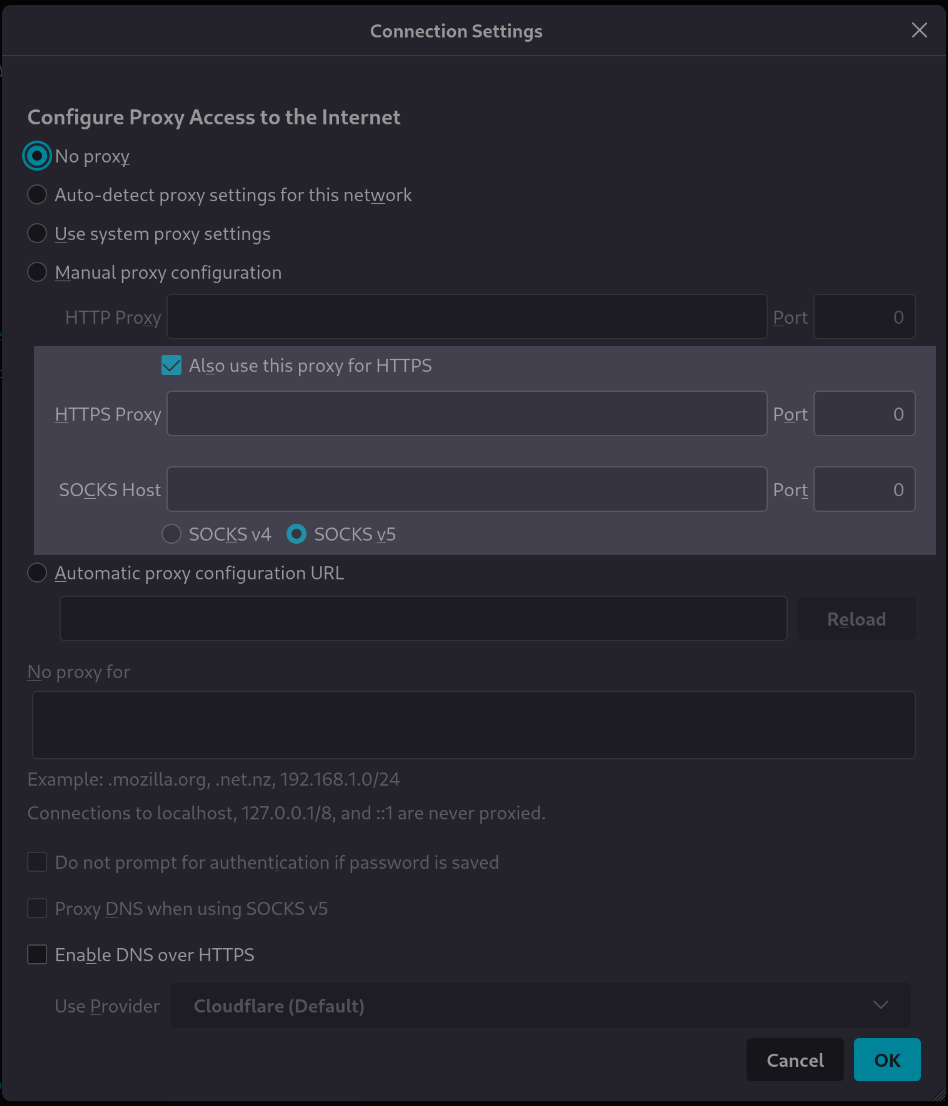
Let’s have a look at the HTPPS configuration corresponding structure file:
the firefox/20-manual.yml structure file
 1%YAML 1.2
 2---
 3version: 1.1
 4
 5manual:
 6
 7  use_for_https: true  # Also use this proxy for HTTPS
 8
 9  https_proxy:
10    description: HTTPS Proxy
11    hidden:
12      variable: _.use_for_https
13
14    address:
15      description: HTTPS address
16      default:
17        variable: __.http_proxy.address
18
19    port:
20      description: HTTPS Port
21      default:
22        variable: __.http_proxy.port
23...
We have added a new variable, named use_for_https here:
-
use_for_https
- Type:
boolean- Default:
true
This is a setting that enables to reuse or not the HTTP proxy configuration for HTTPS
The variable that drives the hidden/show behavior is the use_for_https variable because the hidden property has
a variable target parameter that points to it: variable: _.use_for_https.
Reminder
The underscore and the point before the variable (_.use_for_https) points to the variable that lives in the same
family.
Let’s introduce a new Rougail concept here:
- context
A configuration is highly statefull and can change at any moment.
Sometimes somes minor changes in the user data may involve chain reactions
in the whole configuration.
The context is the state of the user data at one moment, the set of the values of the variables
at a given moment.
This term refers in Rougail to the ability of a system to handle
the statefull state of a configuration.
It expresses the transition between one situation to another situation,
that is, the deeply statefull aspects of a data set.
Do we want to reuse, for the HTTPS mode, the same configuration as for the HTTP mode?
Well, it depends on the context.
Question: how does it work?
How will this variable drive the reuse of HTTP data to HTTPS data?
With this use_for_https boolean variable, there are two possibilities, and only two:
Here is an example with different user values for handling HTTP and HTTPS:
User datas in the user data file config/01/config.yml with use_for_https as false
1---
2proxy_mode: Manual proxy configuration
3manual:
4  http_proxy:
5    address: http.proxy.net
6    port: 3128
7  use_for_https: false
8  https_proxy:
9    address: https.proxy.net
If we launch the Rougail CLI:
rougail -m firefox/ -u yaml -yf config/01/config.yml
We have this output:
╭────────────── Caption ───────────────╮
│ Variable Default value               │
│          Modified value              │
│          (⏳ Original default value) │
╰──────────────────────────────────────╯
Variables:
┣━━ 📓 proxy_mode (Configure Proxy Access to the Internet): Manual proxy
┃   configuration ◀ loaded from the YAML file "config/01/config.yml" (⏳ No
┃   proxy)
┗━━ 📂 manual (Manual proxy configuration)
    ┣━━ 📂 http_proxy (HTTP Proxy)
    ┃   ┣━━ 📓 address (HTTP address): http.proxy.net ◀ loaded from the YAML
    ┃   ┃   file "config/01/config.yml"
    ┃   ┗━━ 📓 port (HTTP Port): 3128 ◀ loaded from the YAML file
    ┃       "config/01/config.yml" (⏳ 8080)
    ┣━━ 📓 use_for_https (Also use this proxy for HTTPS): false ◀ loaded from
    ┃   the YAML file "config/01/config.yml" (⏳ true)
    ┗━━ 📂 https_proxy (HTTPS Proxy)
        ┣━━ 📓 address (HTTPS address): https.proxy.net ◀ loaded from the YAML
        ┃   file "config/01/config.yml" (⏳ http.proxy.net)
        ┗━━ 📓 port (HTTPS Port): 3128
Notice that we have this use_for_https boolean type variable, its default value is True.
We want to offer the possibility of providing an identical or possibly different proxy configuration for the HTTP and for the HTTPS protocols.
Here is an example with identical HTTP and HTTPS proxy configuration:
User datas in the user data file config/02/config.yml with use_for_https as true
1---
2proxy_mode: Manual proxy configuration
3manual:
4  http_proxy:
5    address: http.proxy.net
6    port: 3128
7  use_for_https: true
Let’s launch the Rougail CLI:
rougail -m firefox/ -u yaml -yf config/02/config.yml
We have this output:
╭───────────────────── Caption ─────────────────────╮
│ Variable              Default value               │
│ Unmodifiable variable Modified value              │
│                       (⏳ Original default value) │
╰───────────────────────────────────────────────────╯
Variables:
┣━━ 📓 proxy_mode (Configure Proxy Access to the Internet): Manual proxy
┃   configuration ◀ loaded from the YAML file "config/02/config.yml" (⏳ No
┃   proxy)
┗━━ 📂 manual (Manual proxy configuration)
    ┣━━ 📂 http_proxy (HTTP Proxy)
    ┃   ┣━━ 📓 address (HTTP address): http.proxy.net ◀ loaded from the YAML
    ┃   ┃   file "config/02/config.yml"
    ┃   ┗━━ 📓 port (HTTP Port): 3128 ◀ loaded from the YAML file
    ┃       "config/02/config.yml" (⏳ 8080)
    ┣━━ 📓 use_for_https (Also use this proxy for HTTPS): true ◀ loaded from the
    ┃   YAML file "config/02/config.yml" (⏳ true)
    ┗━━ 📂 https_proxy (HTTPS Proxy)
        ┣━━ 📓 address (HTTPS address): http.proxy.net
        ┗━━ 📓 port (HTTPS Port): 3128
Which is logical, HTTPS proxy variables have no values set yet.
We are going to see how to point HTTPS variables to HTTP variables.
Key points progress
summary
We have now the ability to build contextual settings:
if the proxy_mode variable’s value is not 'Manual proxy configuration' the manual family is disabled
if the proxy_mode variable’s value is 'Manual proxy configuration' then the manual family is enabled
if the use_for_https variable’s value is true, the HTTP configuration will be reused in the HTTPS situation
and the https_proxy family will be hidden
if the manual.https_proxy.address has no value set, the defaut value is the same as the manual.http_proxy.address’s value
(same behavior with the HTTP port and the HTTPS port variable)
And yes, we did it. We have arrived at the end of the proxy’s manual configuration’s section.
Keywords
We now know what a property is, we have seen in details the disabled property,
We can target a variable’s value in the disabled property’s value,
we call it a variable based contextual disabled family,
The hidden property can be set to a family,
The fact that a property can be set dynamically,
The conditional dependency of a hidden property can depends on a boolean variable,
We know what a calculated default value is.