A dynamically built family
Objectives
In this section we will learn how to create a dynamically built family.
In a dynamically built family, instead of duplicating the definition of identical variables in several families, they can be generated automatically.
Prerequisites
We assume that Rougail’s library is installed on your computer.
It is possible to retrieve the current state of the various Rougail files manipulated in this tutorial step by checking out the corresponding tag of the
rougail-tutorialsgit repository. Each tag corresponds to a stage of progress in the tutorial. Of course, you can also decide to copy/paste or download the tutorial files contents while following the tutorial steps.
If you want to follow this tutorial with the help of the corresponding rougail-tutorials git repository, this workshop page corresponds to the tags v1.1_060 to v1.1_061 in the repository.
git clone https://forge.cloud.silique.fr/stove/rougail-tutorials.git
git switch --detach v1.1_060
We handled the HTTPS mode in the previous section. But there’s more modes to handle. Let’s turn back to the firefox’s configuration page:
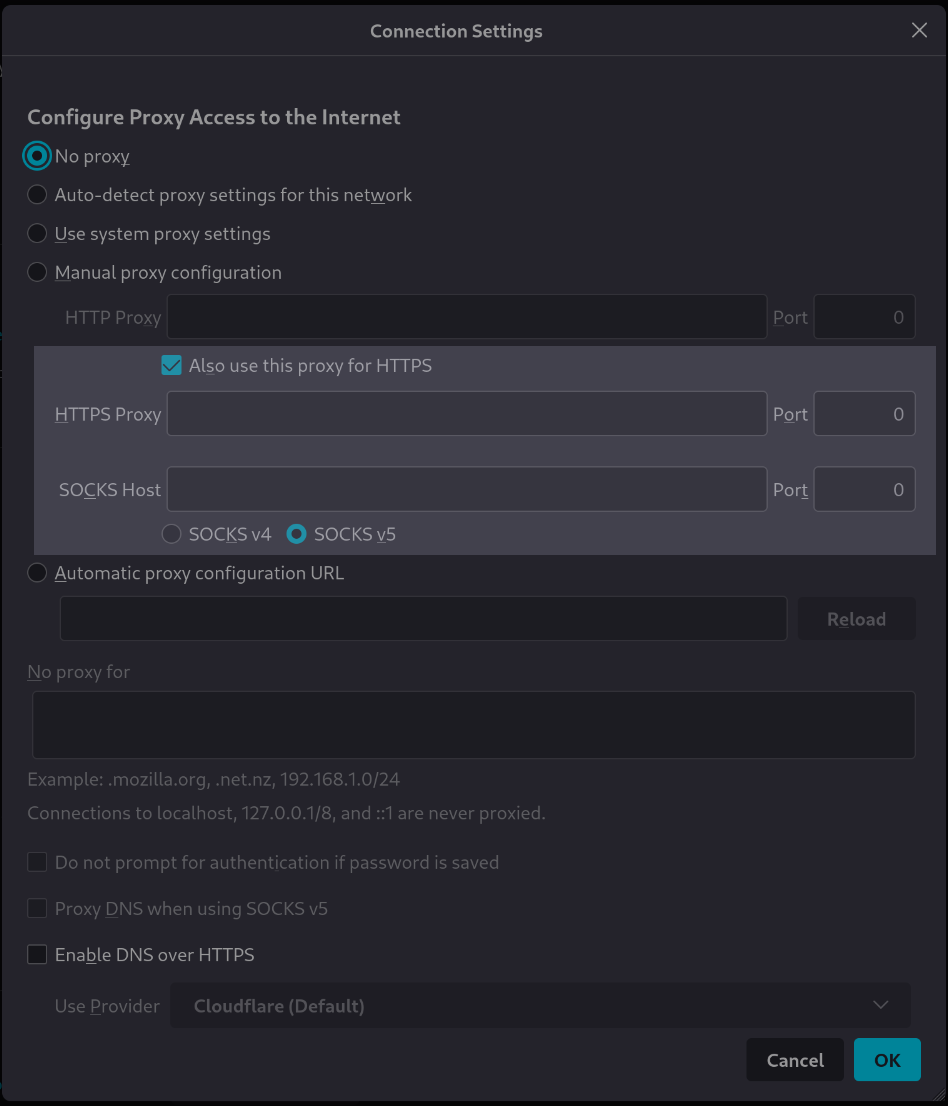
We see that we need to handle the SOCKS configuration in addition to the HTTPS configuration. Moreover, we can see that these two groups of variables (also known as family) are similar in the structure: they both have a host and a port.
There are two proxies that are to be configured :
the HTTPS proxy
the SOCKS proxy
As they have the same structure, would it be possible to define the two of them in one shot?
Note
It’s not the place here to describe what the HTTP and SOCKS protocols are. The interesting point here is that they are very similar in our firefox’s configuration and that we can do batch processing.
Family: A dynamically built family
With Rougail, it is possible to create some kind of a model of family. Kind of a generic family declaration. We call this generic family creation process a dynamic creation because as we will see below, these families exist at the very moment we define their identifiers.
First, here is what we need to make (without identifiers):
https_proxy:
  description: HTTPS Proxy
  ...

  address:
    description: HTTPS address
    ...

  port:
    description: HTTPS Port
    ...

sock_proxy:
  description: SOCKS Proxy
  ...

  address:
    description: SOCKS address
    ...

  port:
    description: SOCKS Port
    ...
Now with identifiers, we have the ability to declare our families this way:
"{{ identifier }}_proxy":
  description: "{{ identifier }} Proxy"
  dynamic:
    - HTTPS
    - SOCKS
  ...

  address:
    description: "{{ identifier }} address"
  ...

  port:
    description: "{{ identifier }} port"
  ...
What is exactly an identifier?
If you used the YAML declaration tool named Ansible, the variable used to iterate over multiple values in a task is called an `item`. We call it an identifier.
It is a symbol used in the context of a loop. For example:
- name: Loop example with 'item'
  ansible.builtin.debug:
    msg: "The current value is {{ item }}"
  loop:
    - value1
    - value2
    - value3
This code will output:
The current value is value1
The current value is value2
The current value is value3
In the Rougail context, we name this item an identifier because it is an item that allow us to define dynamically family names.
- identifier
In the dynamically built family creation field we call an identifier an item that defines a family name. An item is a variable on which an iteration on keywords will be carried out.
An identifier is a local variable, used only for creating multiple iterations, used for creating multiple families in only one declaration.
It allows us to declare very similar families in a more generic way.
Here is the syntax we are using that allows the declaration of multiple families at one time:
"{{ identifier }}_proxy":
  description: "{{ identifier }} Proxy"
  dynamic:
    - HTTPS
    - SOCKS
This identifier is a parameter that enables us to create two families named https_proxy and socks_proxy:
https_proxy:
  description: "HTTPS Proxy"

socks_proxy:
  description: "SOCKS Proxy"
Attention
Be careful when choosing your identifiers items: pay attention that the family names that will be dynamically created have not been declared before in some other YAML structure file.
Here the family name is: "{{ identifier }}_proxy".
If you define a dynamically built family with the https identifer that will
build a https_proxy family and if this familiy already exists,
then rougail will raise a family/variable override warning.
When choosing a dynamically built family name, rougail will replace spaces, accents, uppercases…
by valid character and put all in lowercase. Only ASCII and underscore (”_”) characters are allowed.
As you can see here, the identifier is HTTPS, but the name clearly contains https (in lowercase).
Here is our dynamically built familiy in situation in the firefox/20-manual.yml structure file.
firefox/20-manual.yml structure file with the dynamically built families%YAML 1.2
---
version: 1.1
manual:
use_for_https: true # Also use this proxy for HTTPS
'{{ identifier }}_proxy':
description: '{{ identifier }} Proxy'
hidden:
variable: _.use_for_https
dynamic:
- HTTPS
- SOCKS
address:
description: '{{ identifier }} address'
default:
variable: __.http_proxy.address
port:
description: '{{ identifier }} port'
default:
variable: __.http_proxy.port
...
Here is the user data file on which we will launch the Rougail CLI:
config/01/config.yml user data file---
proxy_mode: Manual proxy configuration
manual:
http_proxy:
address: http.proxy.net
port: 3128
use_for_https: false
https_proxy:
address: https.proxy.net
╭────────────── Caption ───────────────╮
│ Variable Default value               │
│          Modified value              │
│          (⏳ Original default value) │
╰──────────────────────────────────────╯
Variables:
┣━━ 📓 proxy_mode (Configure Proxy Access to the Internet): Manual proxy
┃   configuration ◀ loaded from the YAML file "config/01/config.yml" (⏳ No
┃   proxy)
┗━━ 📂 manual (Manual proxy configuration)
    ┣━━ 📂 http_proxy (HTTP Proxy)
    ┃   ┣━━ 📓 address (HTTP address): http.proxy.net ◀ loaded from the YAML
    ┃   ┃   file "config/01/config.yml"
    ┃   ┗━━ 📓 port (HTTP Port): 3128 ◀ loaded from the YAML file
    ┃       "config/01/config.yml" (⏳ 8080)
    ┣━━ 📓 use_for_https (Also use this proxy for HTTPS): false ◀ loaded from
    ┃   the YAML file "config/01/config.yml" (⏳ true)
    ┣━━ 📂 https_proxy (HTTPS Proxy)
    ┃   ┣━━ 📓 address (HTTPS address): https.proxy.net ◀ loaded from the YAML
    ┃   ┃   file "config/01/config.yml" (⏳ http.proxy.net)
    ┃   ┗━━ 📓 port (HTTPS port): 3128
    ┗━━ 📂 socks_proxy (SOCKS Proxy)
        ┣━━ 📓 address (SOCKS address): http.proxy.net
        ┗━━ 📓 port (SOCKS port): 3128
We can see that the dynamically built families that have been created:
an
HTTPS Proxyfamilya
SOCKS Proxyfamily
and, as we expected, containing an address and a port.
A conditional disabled variable with dynamic identifier
For those who follow the tutorial with the help of the git repository
Now you need to checkout the v1.1_061 version:
git switch --detach v1.1_061
Here is the final version of the HTTPS and SOCKS structure file, we have added
a new variable named version, with the choice type, with a default value,
and which has the disabled property if the configuration is in the SOCKS situation.
We will look at this in more detail below.
firefox/20-proxy.yml structure file%YAML 1.2
---
version: 1.1
manual:
use_for_https: true # Also use this proxy for HTTPS
'{{ identifier }}_proxy':
description: '{{ identifier }} Proxy'
hidden:
variable: _.use_for_https
dynamic:
- HTTPS
- SOCKS
address:
description: '{{ identifier }} address'
default:
variable: __.http_proxy.address
port:
description: '{{ identifier }} port'
default:
variable: __.http_proxy.port
version:
description: SOCKS host version used by proxy
choices:
- v4
- v5
default: v5
disabled:
type: identifier
when: HTTPS
...
The disabled property is assigned here to the version variable
in the case where the identifier is HTTPS.
This means that when the current dynamically built family is determined by the identifier HTTPS, the variable version is disabled
(therefore considered as non-existent) and when the identifier is SOCKS the variable is present (it is accessible).
config/01/config.yml user data file---
proxy_mode: Manual proxy configuration
manual:
http_proxy:
address: http.proxy.net
port: 3128
use_for_https: false
https_proxy:
address: https.proxy.net
The Rougail CLI outputs this:
╭────────────── Caption ───────────────╮
│ Variable Default value               │
│          Modified value              │
│          (⏳ Original default value) │
╰──────────────────────────────────────╯
Variables:
┣━━ 📓 proxy_mode (Configure Proxy Access to the Internet): Manual proxy
┃   configuration ◀ loaded from the YAML file "config/01/config.yml" (⏳ No
┃   proxy)
┗━━ 📂 manual (Manual proxy configuration)
    ┣━━ 📂 http_proxy (HTTP Proxy)
    ┃   ┣━━ 📓 address (HTTP address): http.proxy.net ◀ loaded from the YAML
    ┃   ┃   file "config/01/config.yml"
    ┃   ┗━━ 📓 port (HTTP Port): 3128 ◀ loaded from the YAML file
    ┃       "config/01/config.yml" (⏳ 8080)
    ┣━━ 📓 use_for_https (Also use this proxy for HTTPS): false ◀ loaded from
    ┃   the YAML file "config/01/config.yml" (⏳ true)
    ┣━━ 📂 https_proxy (HTTPS Proxy)
    ┃   ┣━━ 📓 address (HTTPS address): https.proxy.net ◀ loaded from the YAML
    ┃   ┃   file "config/01/config.yml" (⏳ http.proxy.net)
    ┃   ┗━━ 📓 port (HTTPS port): 3128
    ┗━━ 📂 socks_proxy (SOCKS Proxy)
        ┣━━ 📓 address (SOCKS address): http.proxy.net
        ┣━━ 📓 port (SOCKS port): 3128
        ┗━━ 📓 version (SOCKS host version used by proxy): v5
Key points
We now know how to declare a dynamically built family, with setting its identifier.
we have a new use case for the
disabledproperty. We know how to disable a dynamically built variable based on a familiy identifier.