Practice
Objectives
Now it’s your turn. Try making some Rougail. At the same time, if you get stuck, you have the solutions in the Rougail tutorial code repository.
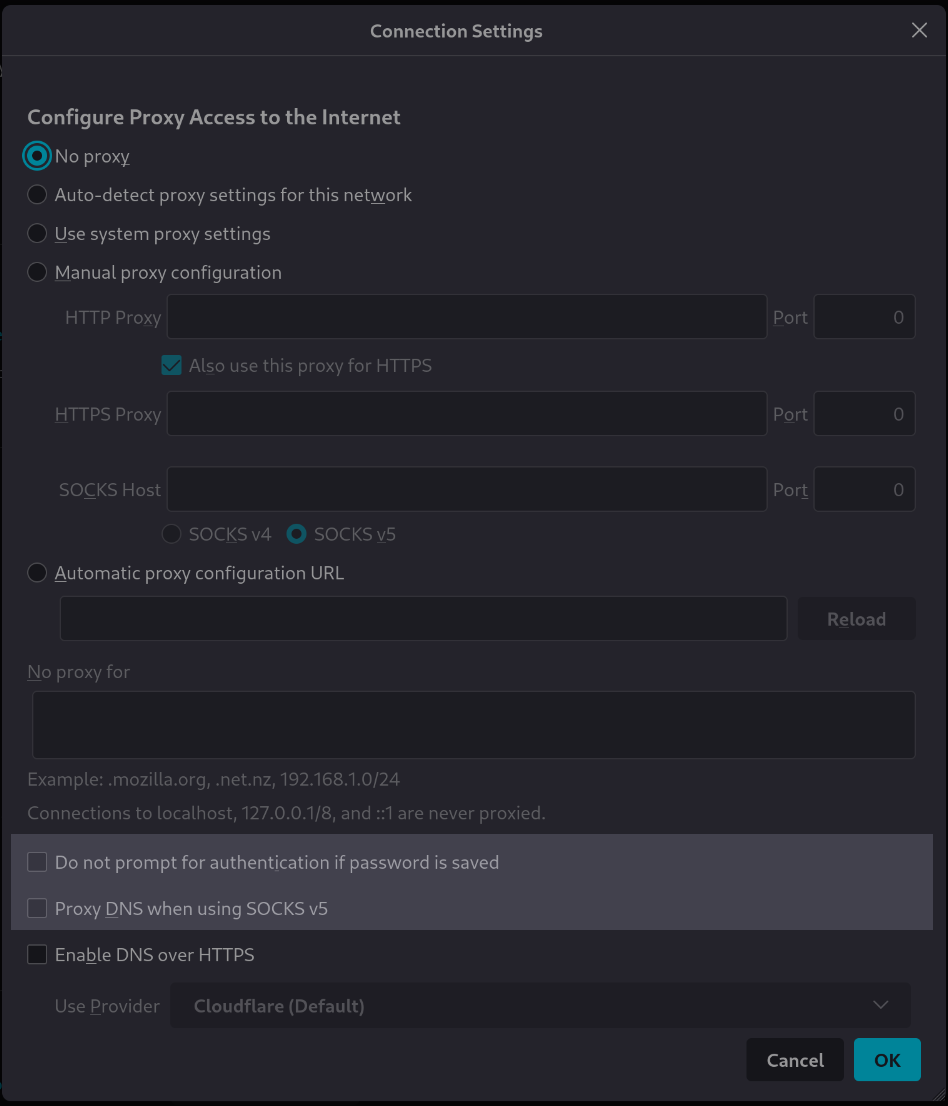
There is nothing new in the two next Firefox variables. So it is the time to practice what we’ve learned until now.
This page is divided in two parts for each variable:
Explain what we want to implement
Propose to you a solution
The best for you is to do this job on your own and compare your work to our propositions.
Here are the two variables in the Firefox configuration’s widget:

These two variables are highlighted here in the lower part of the Firefox configuration’s widget:
Prerequisites
We assume that Rougail’s library is installed on your computer.
It is possible to retrieve the current state of the various Rougail files manipulated in this tutorial step by checking out the corresponding tag of the
rougail-tutorialsgit repository. Each tag corresponds to a stage of progress in the tutorial. Of course, you can also decide to copy/paste or download the tutorial files contents while following the tutorial steps.
If you want to follow this tutorial with the help of the corresponding rougail-tutorials git repository, this workshop page corresponds to the tags 1.1_130 to 1.1_131 in the repository.
git clone https://forge.cloud.silique.fr/stove/rougail-tutorials.git
git switch --detach 1.1_130
A conditional disabled boolean variable
What do we want to be implemented
Exercice
You need to think about:
choose a file name that respect the file naming and organizing convention
define an appropriate variable name, have a look at our variable naming convention
the Firefox description is in negative mode, which is not a good practice for us, we rewrite it in positive mode
the variable is a boolean with the default value
true(the opposite of unchecked option)the variable is available for all proxy mode choice by user, so disable it only when the
proxy modeis “No proxy”
Our solution
Please unroll the “Solution” widget to see our solution:
Solution
firefox/50-prompt_authentication.yml a conditional disabled boolean variable%YAML 1.2
---
version: 1.1
prompt_authentication:
description: Prompt for authentication if password is saved
default: true
disabled:
variable: _.proxy_mode
when: No proxy
...
Here we choosed to name the new structure file
firefox/50-prompt_authentication.yml, the file containing theprompt_authenticationvariable definitionthis variable is
trueby defaultthis variable shall be disabled if the
proxy_modevariable is set to"No proxy"
A Jinja conditional disabled boolean variable
What do we want to be implemented
Exercice
You need to think about:
the choice of a file name that respect the file naming and organizing convention
define an appropriate variable name, have a look at our variable naming convention
the
descriptionparameter will be the Firefox descriptionthe variable is a boolean with the default value
false(unchecked option)the variable is only available with the
"Manual proxy configuration"proxy mode and when the proxy socks version is not v4
Our solution
For those who follow the tutorial with the help of the git repository
Now you need to checkout the v1.1_131 version:
git switch --detach v1.1_131
Please unroll the “Solution” widget to see our solution:
Solution
firefox/55-proxy_dns_socks5.yml a Jinja conditional disabled boolean variable%YAML 1.2
---
version: 1.1
proxy_dns_socks5:
description: Use proxy DNS when using SOCKS v5
default: false
disabled:
jinja: |-
{{ _.proxy_mode != "Manual proxy configuration" or _.manual.socks_proxy.version == 'v4' }}
return_type: boolean
description: |-
if "_.proxy_mode" is not "Manual proxy configuration"
or "_.manual.socks_proxy.version" is "v4"
...
Here we choosed to name the new structure file
firefox/55-proxy_dns_socks5.yml, the file containing theproxy_dns_socks5variable definitionthis variable is
falseby defaultthis variable shall be disabled if the
proxy_modevariable is not set to"Manual proxy configuration"and Socks version isv4.